Welcome to ProMeteo
ProMeteo is a Python library designed to manipulate time series data collected by sonic anemometers. It is structured into three modules:
core: for importing the raw data and the configuration file and computing basic statistics on sliding window;pre_processing: for uniforming and cleaning raw time series;frame: for rotating wind data and computing wind direction.
These modules can be found in the src/ directory of the repository.
To run ProMeteo, you first need to clone the repository to a local directory using one of the standard GitHub cloning methods.
Using HTTPS:
git clone https://github.com/aleszamp98/ProMeteo.git
Or using SSH:
git clone git@github.com:aleszamp98/ProMeteo.git
Once cloned, you can either place your data files in the /data subdirectory,
or specify a custom data source path in the configuration file, located at /config/config.txt,
by setting the rawdata_path parameter accordingly.
Execution is managed via the main script main.py, which should be run from the root directory of the project using the following command:
python3 main.py
This will execute the script, which will read the configuration file located in the /config subdirectory.
It is possible to generate synthetic input data using the generate_data.py script located in the /data directory.
A detailed description of this synthetic dataset is available in the section Test data (test_data.csv).
Requirements
Before running the script, make sure the following Python dependencies are installed:
numpypandas
You can install them using pip:
pip install numpy pandas
or by using a package manager like conda if you are using the Anaconda distribution.
Supported Anemometers
ProMeteo currently supports the processing of time series data from the following sonic anemometer models:
RM Young 81000: RM Young 81000 Manual
Campbell CSAT3: CSAT3 Manual
It handles the three wind components defined in each manufacturer’s proprietary Cartesian coordinate system, as well as the time series of sonic temperature.
Input and Output
Input files
data.csv:.csvfile containing Time, u, v, w, T_s columns.The variables u, v, and w denote the wind components in the instrument’s native Cartesian coordinate system, with arbitrary units, though the subsequent choice of parameters for threshold definitions must be consistent with the units used. T_s represents the sonic temperature. The “Time” column should contain timestamps readable as pandas datetime indices.
Output files
preprocessed.csv: .csv file containing Time, u, v, w, T_s columns.These columns represent the preprocessed time series, where anomalous values have been removed and the data has been made continuous through interpolation.
preprocessed_rotated_data.csv: .csv file containing Time, u, v, w, T_s, wind_dir columns.These columns represent the preprocessed and rotated wind components with horizontal wind direction in degrees (with respect to the North).
Main Script Workflow
The main.py script performs the following steps:
Loads the configuration file;
Imports raw data into a
pandas.DataFrame;Preprocesses the data:
Fills missing timestamps;
Removes physically unrealistic values based on thresholds;
Despikes the data using the selected method (VM97 or robust); see the Despiking page for more details;
Interpolates NaN values;
Saves the preprocessed data to
preprocessed.csv;Rotates the wind components to the specified reference frame (LEC or streamline) and computes wind direction in the LEC frame; See the Rotation page for more details.
Saves the rotated data to
preprocessed_rotated_<selected_frame>_data.csv.
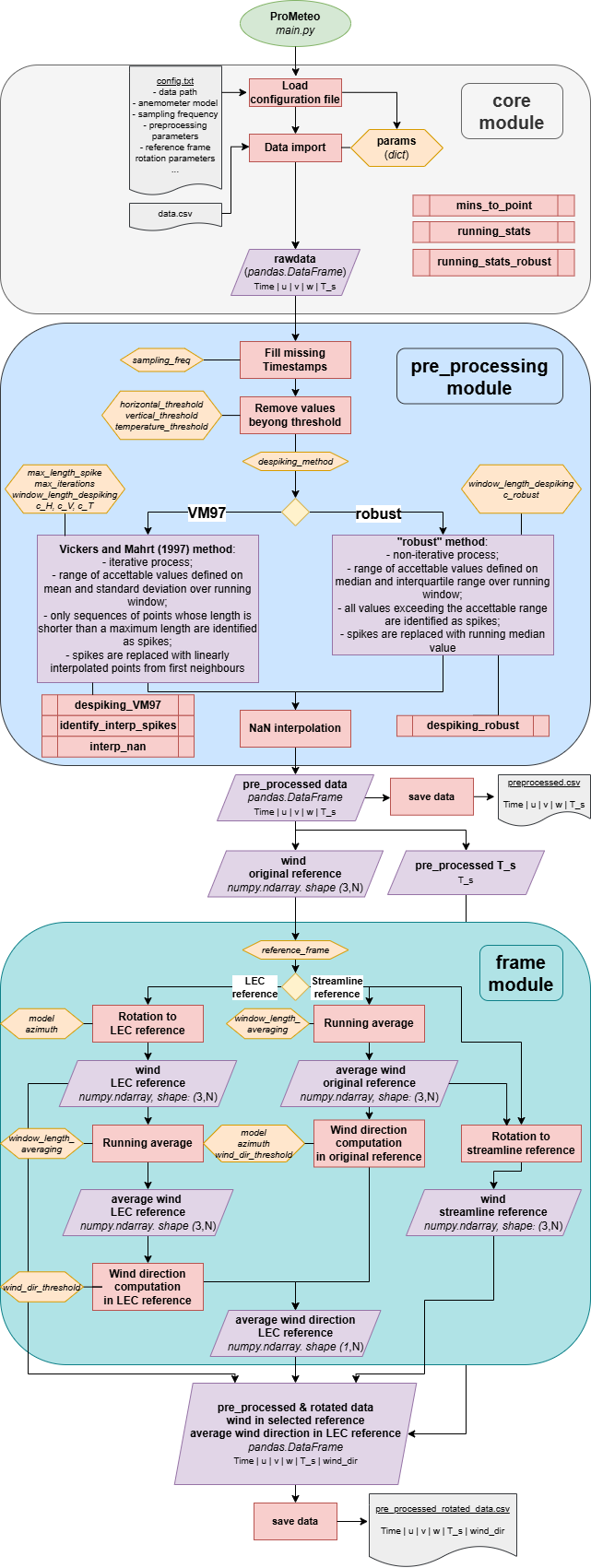
During execution, the program communicates with the user via the terminal and generates a log file that captures the same interactions, allowing it to be run in the background.
Configuration File
The configuration file can be found at config/config.txt. It is a plain text file in INI format that defines all parameters required to execute main.py. Below is a description of the available parameters, grouped by section.
[general]
rawdata_path: path to the input .csv file containing raw data, relative to the script location;dir_out: path of the output directory, relative to the script location, where results will be saved;sampling_freq: sampling frequency in Hz;model: sonic anemometer model:RM_YOUNG_81000;CAMPBELL_CSAT3.
[remove_beyond_threshold]
Thresholds beyond which values are replaced with NaN:
horizontal_threshold: for horizontal wind components;vertical_threshold: for vertical wind component;temperature_threshold: for sonic temperature.
[despiking]
despiking_method: method for spike detection and removal:VM97: Vickers and Mahrt (1997) method;robust: custom method.
Parameters for despiking logic, see Despiking page:
window_length_despiking: length of the moving window (in minutes);max_length_spike: max consecutive out-of-bound values to flag as spikes (used only withVM97method);max_iterations: max number of despiking iterations (used only withVM97method);c_H,c_V,c_T: (used only withVM97method);c_robust: used withrobustmethod.
[rotation]
reference_frame: reference frame for wind component rotation, see Rotation page:LEC: Local Earth Coordinate system;streamline: Streamline coordinate system;
azimuth: azimuthal orientation of the anemometer head (in degrees, with respect to the North).wind_dir_threshold: threshold for horizontal wind speed below which wind direction is not computed.
[averaging]
window_length_averaging: moving window length (in minutes) used to compute:Mean horizontal wind components for streamline rotation;
Wind direction.
Design Notes
Functions are modular and can be reused outside
main.py.Preprocessing sequence is important:
Threshold filtering precedes despiking to avoid bias in statistical thresholds.
NaN interpolation is performed last to ensure continuity before rotation.
T_s is not rotated, as it is not a wind component.
Testing
The library includes tests in the tests/ directory. Run tests, from the main directory, with:
pytest
Test functions are organized within the tests/ directory in files named according to the pattern test_<module_name>.py,
with each file targeting a specific module of the library.
Inside each file, individual test functions follow the naming convention test_<function_name_to_test>.
Contributing
ProMeteo is an open project. Suggestions, corrections, and contributions are very welcome!
Open an issue for bugs or feature requests;
Submit a pull request to contribute code or improvements;
Or contact me directly (see GitHub profile page).
How to Cite
If you use ProMeteo in a publication or presentation, please cite it as:
@software{ProMeteo_zampella_alessandro,
  author       = {Alessandro Zampella},
  title        = {ProMeteo},
  month        = apr,
  year         = 2025,
  url          = {https://github.com/aleszamp98/ProMeteo.git}
}
Planned Features
Future versions of Prometeo will include:
Implementation of Reynolds decomposition;
Computation of derived atmospheric variables such as:
Richardson number;
Brunt–Väisälä frequency;
Wavelet analysis of time series.
Stay tuned for updates!